

How it works
How videos start in under a second, and keep playing
Unshorted plays videos in YouTube's own player, so it keeps everything that player has. This page says why videos still start faster than a page of YouTube's would, what Background Play does when you leave a video, and why the app doesn't use Apple's player instead. The video says the same in just over a minute and a half.
The short version
- The player is ready before you pick a video. When the app opens, it loads YouTube's mobile website out of sight.
- A video is a tap on that website. The site's own code fetches it, so nothing loads but the video, and it starts in half a second to a second.
- One player for the whole app, with YouTube's quality, captions, speed and chapters, and a native screen around it.
- Background Play, off at first, keeps a video going when you leave its screen, in a mini player, and in Picture in Picture over your other apps and the lock screen. When you leave the app, it can pause, float, or keep its sound playing.
- Apple's player isn't an option: YouTube gives no stream it could play, and it wouldn't start videos sooner anyway.
Starting fast
Ready before the first video
A second after the app opens, it loads YouTube's mobile home page (m.youtube.com) in a web view, out of sight. The page's player and all of the site's code are then up and waiting.
A video is a tap on the site
To play a video, the app follows a link to it on that page, as a tap on the mobile website does. The site's own code fetches the video, shows its player and plays it. Nothing loads but the video. This is also the way YouTube doesn't hold videos back (why that matters).
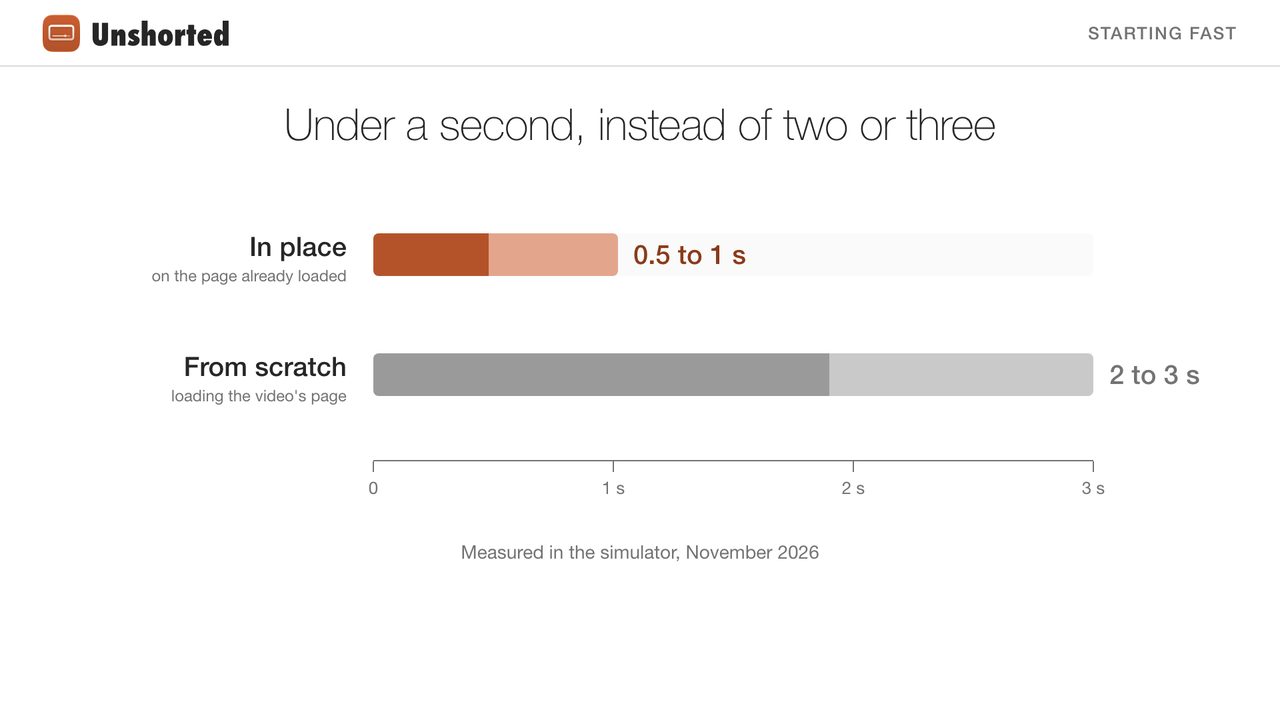
| Putting a video on the page | From the tap to its first picture |
|---|---|
| In place, on the page kept loaded | 0.48 to 1.02 seconds, in 12 starts |
| Loading the video's page from scratch | 1.9 to 3.0 seconds |
Measured in the iOS simulator in November 2026. If you tap a video within a second or two of opening the app, before the page is ready, it loads the slow way.
One player for the whole app
There's one player, and it goes to the screen you're on. Opening another video moves it there; going back to a video you left shows its picture with a play button, and the player picks up where it was. Videos start where you stopped, if you'd watched more than 15 seconds and not quite reached the end.
YouTube's player, a native screen
Because the player is YouTube's own, it keeps everything it has: quality, captions, speed and chapters in its settings, a double tap on a side to skip 10 seconds, and full screen. Everything around it is native: the title, Like, Watch Later, Download, Share, the channel with Subscribe, the comments and Up Next.
Background Play
With Background Play off, as it is at first, a video pauses when you leave its screen or the app. Turn it on under You › Background Play (On, or Headphones Only, which keeps playing only with headphones or a car stereo connected), and a video keeps going when you leave its screen.
A mini player
Leave a playing video's screen and it docks into a mini player above the tabs, picture and sound carrying on. Tap it to go back to the video, or close it.
Picture in Picture
A Picture in Picture button joins the ones under the video. Tap it, and the video floats over your other apps. YouTube's player stops a floating video for viewers without YouTube Premium; Unshorted works around that so the video keeps playing (how).
Locked, or in another app
While it floats, the video plays on when you lock the phone or switch apps, and the lock screen, Control Center and your AirPods control it. Checked on an iPhone in November 2026.
Outside Picture in Picture, iOS pauses a video in a web page when its app leaves the front or the phone locks. You › When You Leave the App says what happens then:
- Pause, at first: the video waits, and picks up when you're back.
- Picture in Picture: the video floats by itself as you leave, and goes on there.
- Keep Playing: its sound goes on in Apple's own player, which iOS lets play in the background, with the lock screen's controls, and the video picks up from there when you're back. The sound comes from YouTube through yt-dlp, as downloads do.
The last two are new, and have been checked in the iOS simulator only.
Why it's a setting
Apart from Keep Playing's sound, all of this rides on YouTube's own player, kept alive rather than handed to a native one, because there's no native stream of the video to hand it to (below). It can be less steady than a native player, so it's off until you turn it on.
Why not Apple's player?
Apple's player would give native controls, Picture in Picture anywhere and sound in the background by itself. It needs a stream it can read, and YouTube no longer gives a browser one: checked from the app in November 2026, as Safari on an iPhone and as Safari on a Mac, YouTube's player data had no stream Apple's player could play, only YouTube's own streaming protocol, or addresses that need YouTube's player script and a proof-of-origin token. What's left is asking for streams as one of YouTube's own apps would, which breaks whenever YouTube moves. Downloads do that, through yt-dlp (how), and so does Keep Playing for a video's sound; the player doesn't.
It wouldn't start videos sooner either. Measured in the simulator, on the same network:
| Step | Time |
|---|---|
| A video's start in Unshorted, from the tap to the first picture | 0.6 to 1.0 s |
| of which: YouTube's server preparing the video's data | 0.22 to 0.33 s |
| of which: its video servers sending the first pieces | about 0.1 to 0.3 s |
| of which: the page's own work | about 0.1 to 0.2 s |
| Apple's player, from a stream's address to its first picture | 0.13 to 0.5 s, 0.4 typically |
A native player waits for the same two servers, then adds its own time: a tenth or two of a second better at most, and no better on a slow connection.
Known limits
- Picture in Picture doesn't carry from one video to the next: starting another video closes the window.
- When You Leave the App's Picture in Picture can't tell leaving the app from pulling down Control Center or a notification; if the app comes back without having left, the video goes back into the page.
- Background Play leans on how YouTube's player and iOS behave, and either can change.
- Still to confirm on an iPhone: the floating window staying open once the video has left its screen.
Questions
Why do videos in Unshorted start so fast?
YouTube's mobile website is loaded out of sight when the app opens, so its player is ready, and each video is put on it the way a tap on the site does. Only the video loads: it starts in half a second to a second.
Can Unshorted play YouTube in the background?
With You › Background Play turned on (it's off at first), a video keeps going when you leave its screen, in a mini player. In Picture in Picture it also plays on in other apps and with the phone locked, with the lock screen's and AirPods' controls. Otherwise iOS pauses it when you leave the app, unless You › When You Leave the App says to float it into Picture in Picture or keep its sound playing.
Can the video go into Picture in Picture by itself when I leave the app?
Yes: choose Picture in Picture under You › When You Leave the App, with Background Play on. Otherwise tap the Picture in Picture button under the video. Downloaded videos play in Apple's own player, which floats them off by itself.
The video was made with free software, from files in the repository: its voice is Kokoro, an open text-to-speech model, and its pictures and sounds are drawn by a script. Next: how downloads work.